![[Solved] Why is Desktop Underwriter (DU) Rejecting Files?](https://cdn.prod.website-files.com/6731bc6e813a541b54c30b10/6aa11212d02666b337b8d2f4_desktop-underwriter-reject-file-banner.jpg)
Written by

Eric
Share this article

.svg)
Subscribe to updates
Few moments in mortgage processing feel as frustrating as submitting a clean Form 1003, expecting an Approve/Eligible, only to watch Desktop Underwriter spit back an error code or a Refer with Caution.
In my years underwriting conventional pipelines, I have seen that DU rejections fall into two distinct buckets: technical data glitches that freeze the engine, or rigid guideline constraints. Here is how to fix them.
Key Takeaways
- Technical rejection codes (like 111349 or 30000300) mean the file never made it through underwriting due to bureau transmission mismatches or payload breaks.
- A 60‑day (or greater) mortgage delinquency reported within the 12 months prior to the credit report date generally results in an Ineligible recommendation in DU and is not curable by simply paying the account current. However, if the delinquency is a reporting error, it can be corrected through documentation and dispute processes, which may allow resubmission or alternative underwriting paths.
- Desktop Underwriter does not impose a hard two-borrower limit on a single loan casefile. However, many lenders' credit vendors or LOS configurations restrict a single tri‑merge credit pull to two borrowers, requiring additional applicants to be handled via linked files or alternative pulls.
- Heavy debt-to-income and thin reserve combinations often push loans outside acquisition preferences, even when credit scores look solid.
- Many findings issues can be resolved by auditing entry fields or adjusting loan terms. For some Approve/Ineligible or Refer with Caution outcomes, manual underwriting may provide an alternative path, but DU Ineligible recommendations driven by hard eligibility rules (e.g., excessive prior mortgage delinquencies) generally cannot be overridden by manual underwriting for conventional delivery.
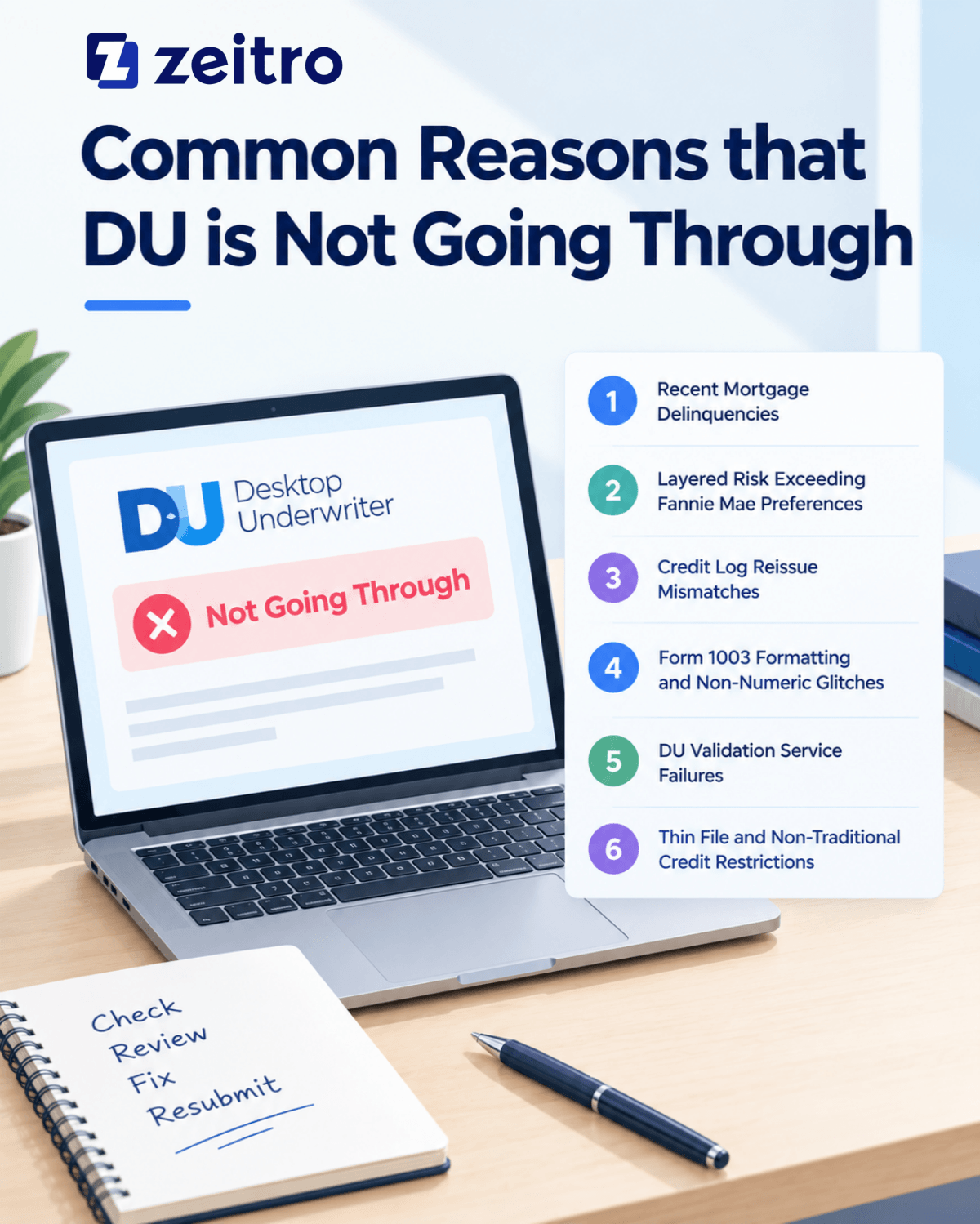
Common Reasons that DU is Not Going Through
Desktop Underwriter evaluates files with zero tolerance for incomplete data or borderline guideline violations. Whenever a file stalls in my queue, I immediately inspect these six problem areas across technical submission screens and financial ratios.
#1. Recent Mortgage Delinquencies (The Hard Ineligible Stop)
The quickest way to get an Ineligible recommendation is a recent late payment on real estate debt. Under Fannie Mae guidelines, if any borrower's credit report shows a mortgage tradeline 60 days or more past due within the preceding 12 months, the automated engine stops dead in its tracks. This restriction applies across all housing obligations: first liens, second mortgages, home improvement loans, HELOCs, and manufactured home debt.
One mistake I frequently see loan officers make is advising clients to bring the past-due balance current right before closing. DU rules explicitly state that paying off delinquent balances late in the game does not cure this restriction. Unless the reporting bureau genuinely committed an error, which we can override with specific documentation, that delinquency creates an insurmountable wall for automated delivery.
#2. Layered Risk Exceeding Fannie Mae Acquisition Preferences
Sometimes your file returns an Approve/Ineligible or Refer with Caution recommendation, even though every single metric meets general maximum thresholds. When this happens, you are dealing with risk layering. DU does not look at debt ratios in a vacuum. It weighs the total balance between credit scores, loan-to-value (LTV), debt-to-income (DTI), and liquid reserves.
For instance, a borrower with a 49% DTI might sail through if they have significant post-closing reserves and a 740 credit score. However, that same 49% DTI paired with a 95% LTV, a 660 credit score, and minimum down payment funds will exceed the automated appetite of the system. In my experience, tweaking the structure by adding documented reserves or paying off small revolving accounts to lower the DTI by just two points often flips the decision back to eligible.
#3. Credit Log Reissue Mismatches and Borrower Limits
Technical rejections occur before underwriting analysis even begins. The most prevalent trigger in my pipeline involves credit reissue mismatches. When your loan origination software calls the credit bureau to pull or reissue a file, every single identifier, full legal name, Social Security number, generation suffix (Jr., III), and street address, must align exactly with the original repository record. A missing apartment unit number or a transposed digit will freeze the request.
Another common operational hurdle is the number of borrowers. DU permits a maximum of two borrowers per individual credit pull. Whenever my team structures a file with three or four co-borrowers, we must split them into two linked loan applications inside our software. Attempting to force three names through a single bureau request guarantees an immediate technical crash.
#4. Form 1003 Formatting and Non-Numeric Glitches
Because DU relies on standardized MISMO data translation, seemingly harmless typing errors can cause complete submission failures. I once spent an entire morning troubleshooting a rejected file only to find an accidental space entered in the borrower's age field, along with a dash tucked into a zip code. When an automated engine expects a strict integer, any letter or special character triggers a validation breakdown.
Another frequent culprit is unlinked real estate owned (REO) entries. If a property is listed in the schedule of real estate, but the corresponding mortgage liability is left floating unassigned, the engine cannot correctly calculate net rental math or housing payment structures. Cleaning up unmapped liabilities, eliminating phantom zero-dollar balances, and ensuring all required drop-downs are populated will resolve the majority of technical entry halts.
#5. DU Validation Service (Day 1 Certainty®) Failures
Using automated verification services for income and assets can speed up approvals, but they create strict validation hurdles. When utilizing the DU Validation Service, the software cross-checks external data vendors against your 1003 entries in real time. If there is even a slight discrepancy, the validation fails, and the file stalls out.
A common failure point with DU Validation Service is mismatched employer or income data. Using a trade name or abbreviation can contribute to a mismatch if the verification report reflects a different legal entity name, but failures more often stem from discrepancies in income amounts, employment status, or expired/out‑of‑window verification reports.
Entering an income line item as zero dollars or submitting outdated verification reference IDs will also drop the file out of automated certainty. To keep the submission moving, match the legal employer spelling letter for letter and verify that all vendor reports remain active within their allowable window.
#6. Thin File and Non-Traditional Credit Restrictions
DU can evaluate borrowers with limited or no traditional credit history, but eligibility is tightly tied to occupancy and transaction type. Files with no usable credit scores that are structured as second homes, investment properties, or standard cash‑out refinances typically will not receive an Approve/Eligible recommendation and often result in Ineligible or require manual underwriting, depending on the overall risk profile and documentation.
When none of the borrowers have a usable traditional credit score, Fannie Mae generally requires the transaction to be a purchase or limited cash‑out refinance of a one‑to‑four‑unit principal residence, and the file must satisfy nontraditional credit documentation requirements (or a qualifying cash‑flow assessment). Files that do not meet these conditions typically will not receive an Approve/Eligible recommendation in DU and may need manual underwriting or a different program path.
If you attempt to run a thin-file borrower on an investment property, a second home, or a cash-out refinance transaction, the system returns an immediate Ineligible finding. I always review credit depth prior to submission. If a buyer lacks traditional credit depth on an excluded transaction type, structuring for manual underwriting from day one saves weeks of rework.
How to Resolve a Rejection from DU?
Whenever a file in my pipeline gets stopped by DU, I avoid guessing and follow a step-by-step diagnostic workflow:
- Audit the 1003 for Entry Flaws: Review every data screen in your origination software. Verify that names and addresses match the credit report character-for-character, eliminate unlinked liabilities, remove zero-dollar lines, and verify no letters exist in numeric fields.
- Correct Erroneous Mortgage Delinquencies: If a credit bureau shows a 60-day late mortgage payment that is demonstrably wrong, document the proof. You can instruct DU to disregard the false mark by typing "Confirmed Mtg Del Incorrect" into the online loan application remarks and resubmitting.
- Restructure Financial Ratios: For files pushed into Refer with Caution due to risk layering, look for small adjustments. Pay off an installment balance with less than ten payments remaining, source additional gift funds for reserves, or increase down payment to drop LTV brackets.
- Clear Credit Bureau Ties: If you receive a bureau transmission error, unlink the credit report, verify your agency credentials in your software setup, re-pull the report using the reference ID, and resubmit.
- Pivot to Manual Underwriting: If the file is rated Approve/Ineligible solely due to product constraints rather than hard derogatory credit, verify if the loan program permits manual underwriting. Compiling a full credit package for an underwriter's manual review can turn a dead automated file into a closed loan.

More FAQs About DU Rejection
Q1. What is DU Error 111349 (Credit Agency Error 42)?
Error 111349 is one of the most frequent technical roadblocks in our software. It indicates that the credit agency rejected your reissue request because borrower details in the loan application do not match the repository archive.
How to fix it: Pull open the raw credit report PDF and compare the borrower's name, suffix, and address against your 1003 line by line. Even an extra period or missing apartment number can cause it. Match the application to the credit report, or contact your credit vendor to update the master record before re-submitting.
Q2. What does DU error code 30000300 mean?
Error 30000300 represents a General Failure (often tagged as GUSSBA_ERROR). This is a system-level communication breakdown between your loan origination platform and Fannie Mae's servers. It indicates an unhandled exception or data translation error in the background XML transmission.
How to fix it: First, check your Fannie Mae credentials in your software interface settings. Next, look for blank required drop-down menus or corrupted data in your loan summary. If the setup is clean, Fannie Mae servers may be experiencing maintenance. Wait fifteen minutes, save the file, restart your software, and re-submit.
Q3. How to fix DU Error imt 101640?
Error imt 101640 is an Interface Messaging Transaction general failure. It occurs when DU cannot parse the loan terms or repayment structure because of missing or contradictory entries on your loan setup screen.
How to fix it: Inspect your loan terms, amortization type, and note structure. Make sure your loan program matches the interest rate type (such as fixed versus adjustable) and that the amortization term matches the loan term. Double-check that all property use and occupancy drop-downs are populated. Re-saving these screens refreshes the data packet and typically clears the failure.
Q4. What is DU error 111352?
Error 111352 flags an invalid credential or transmission fault between DU and your credit bureau. This means the automated engine attempted to access the credit file using your saved credentials, but the credit agency refused the connection.
How to fix it: Navigate to your software's credit configuration screen. Confirm that your bureau account number, password, and credit affiliate code are entered correctly. Keep in mind that automated underwriting credentials often differ from direct bureau website passwords. Re-enter your credentials, re-authenticate your connection, and run a fresh credit-only test before re-submitting to DU.
Q5. What does DU error 111336 mean?
Error 111336 corresponds to Credit Agency Error 01, meaning the credit bureau did not recognize the account number or password submitted in the payload. It is an authorization wall preventing DU from pulling or reissuing the tri-merge file.
How to fix it: Verify your credit interface settings for accidental spaces before or after your user ID and password. Ensure that your credit provider has authorized your branch account specifically for automated Fannie Mae reissues. After verifying the login credentials with your credit rep, refresh the interface settings and re-issue the report.
Q6. What is DU error 118347?
Error 118347 indicates a missing or invalid "Section of the Act" code. This typically occurs in loan origination systems when a government loan type is selected and required statutory fields are not populated correctly. Note that FHA loans are generally underwritten via FHA's own systems (e.g., TOTAL Scorecard), not through Fannie Mae's DU for conventional eligibility.
How to fix it: Go to your loan origination system's Fannie Mae Government screen. Ensure the Section of the Act field is properly populated with the correct statutory code (such as 203B for standard purchases). Also, verify that your agency case number is entered without extra spaces. If processing a conventional loan, confirm you haven't mistakenly selected a government loan type.
Conclusion
Navigating Desktop Underwriter rejections requires treating the automated engine as a strict logical rulebook rather than a mystery. Whether you are dealing with a frustrating XML communication glitch or a complex risk-layering issue, almost every rejection has a defined solution.
By maintaining meticulous 1003 data hygiene, learning your error codes, and restructuring loan metrics where necessary, you can consistently convert stalled files into clean, deliverable approvals for your borrowers.
Note: This article summarizes common DU rejection scenarios based on industry practice and publicly available Fannie Mae guidance (e.g., Selling Guide sections on credit and prior mortgage payment history). It is not a substitute for the official Fannie Mae Selling Guide or lender overlays. Always verify current requirements before submission.
People Also Read
- Tutorial: How to Generate a 1003 Form in 3 Ways?
- Best AI Mortgage Underwriting Software for Loan Professionals
- [Solved] How Long Does Mortgage Underwriting Take?
- Mortgage Income Requirements: Learn Before You Apply
- Mortgage Underwriting Condition: What and How to Clear?
- Reasons: Why Is Income Not Qualifying for a Mortgage?
- What Documents Should I Request Upfront for a Mortgage?

![[Tips for Loan Officers] How Can I Lower Borrower DTI?](https://cdn.prod.website-files.com/6731bc6e813a541b54c30b10/6aa3b89e281a639e7a5c6fca_lower-debt-to-income-ratio-banner.jpg)